From "Give Me a Number" to "Help Me Decide"
An AI-assisted intake tool for analytics teams stuck fielding requests instead of shaping decisions. It pairs an adaptive, conversational front-end for business stakeholders with a living team knowledge base: automating initial triage, catching tribal knowledge, and drafting structured scoping docs so analysts can focus on high-impact sprint work.
The problem: stuck in reactive mode
Across several industries, I've watched analytics teams land in the same trap: reactive, pull-the-number mode, organized around however requests happen to arrive rather than what the business actually needs. When stakeholders route each ask to whichever analyst they know best - or worse, send the same ask to two or three analysts at once hoping someone answers first - nobody is prioritizing with the full picture in view: every stakeholder group, the real business impact, the actual timelines. The work never feels finished, and burnout follows close behind.
I've built a few iterations of intake processes to move teams out of that trap and into a prioritized, sprint-based system instead. A stakeholder committee sets priorities, so analysts are working the highest-impact asks rather than whoever asked loudest or most recently. Prioritization stays visible across groups, too. Marketing can see why an analyst is heads-down on a Product request this sprint, instead of wondering why their own ask seems to be sitting untouched. And a sprint gives analysts something reactive work rarely offers: a finite, achievable list for the period, not an infinite treadmill.
Getting analytics a seat at the table
Prioritization gets a team out of reactive mode. Getting analytics an actual seat at the decision-making table takes one more step: changing how the request itself gets asked.
Left alone, stakeholders default to asking for a metric instead of naming the decision they're actually trying to make. I coach analysts to push back on metric-first asks and climb the "so what" ladder: the questions that surface the real decision underneath. For example:
"I need retention from the past two weeks."
Happy to pull that - what is it feeding into? Is there a decision you're making with this, or more of a general check-in?
"We're thinking about building an event next month for our competitive players and want to know if it's worth doing."
And what would actually make you hold off on it? Is the worry that there just aren't enough competitive players still active to make it worth running?
"Yes, exactly. We need to be able to generate enough participation and revenue to hit our targets for the month, and if this isn't going to reach enough players, we need to do something else."
That's a far more layered question than "I need retention" alone. It means knowing who typically participates in events like this, how they've historically heard about them, what current counts look like for that population, and with the revenue target slipped in there even a spender layer - and yes, then retention for those specific segments. Answer only the literal metric and skip the ladder, and I've seen it point stakeholders toward the exact opposite of what the real analysis would have shown.
Climbing that ladder is also what teaches stakeholders that analytics is more than charts on a slide. It's how the team earns a seat in the room before the decision gets made, not a request for a chart after.
Where AI fits — and where it deliberately doesn't
AI doesn't know what it doesn't know, and it will answer just as confidently either way. Analysts bring context, business intuition, and judgment that a probabilistic model lacks. This tool keeps the analyst firmly in control: AI handles structured interviewing, tribal knowledge retrieval, and process framing, but human judgment makes the call.
There's a more concrete reason for that line, too. Most Gen AI reporting efforts run into the same wall: AI is probabilistic, and analytics is deterministic. A hallucinated number is bad in a way that's hard to walk back. Even when it doesn't lead to an outright bad decision, it damages trust in the data itself, and that trust doesn't come back easily. So instead of pointing AI at the numbers, this tool points it at something where a wrong guess is cheap to catch and correct: the intake conversation, and the knowledge base behind it.
Every analytics team builds up scar tissue over time — the one analyst who just knows the app went down last year on that particular Tuesday, so this year's comps need an asterisk. That knowledge usually lives in one person's head and a scattered Slack thread, and it surfaces right when it's about to save (or quietly ruin) an analysis. This tool is built to catch that tribal knowledge as analysts teach it to the AI once, and put it in front of everyone - human and AI alike - the next time it's relevant.
How it works
For stakeholders
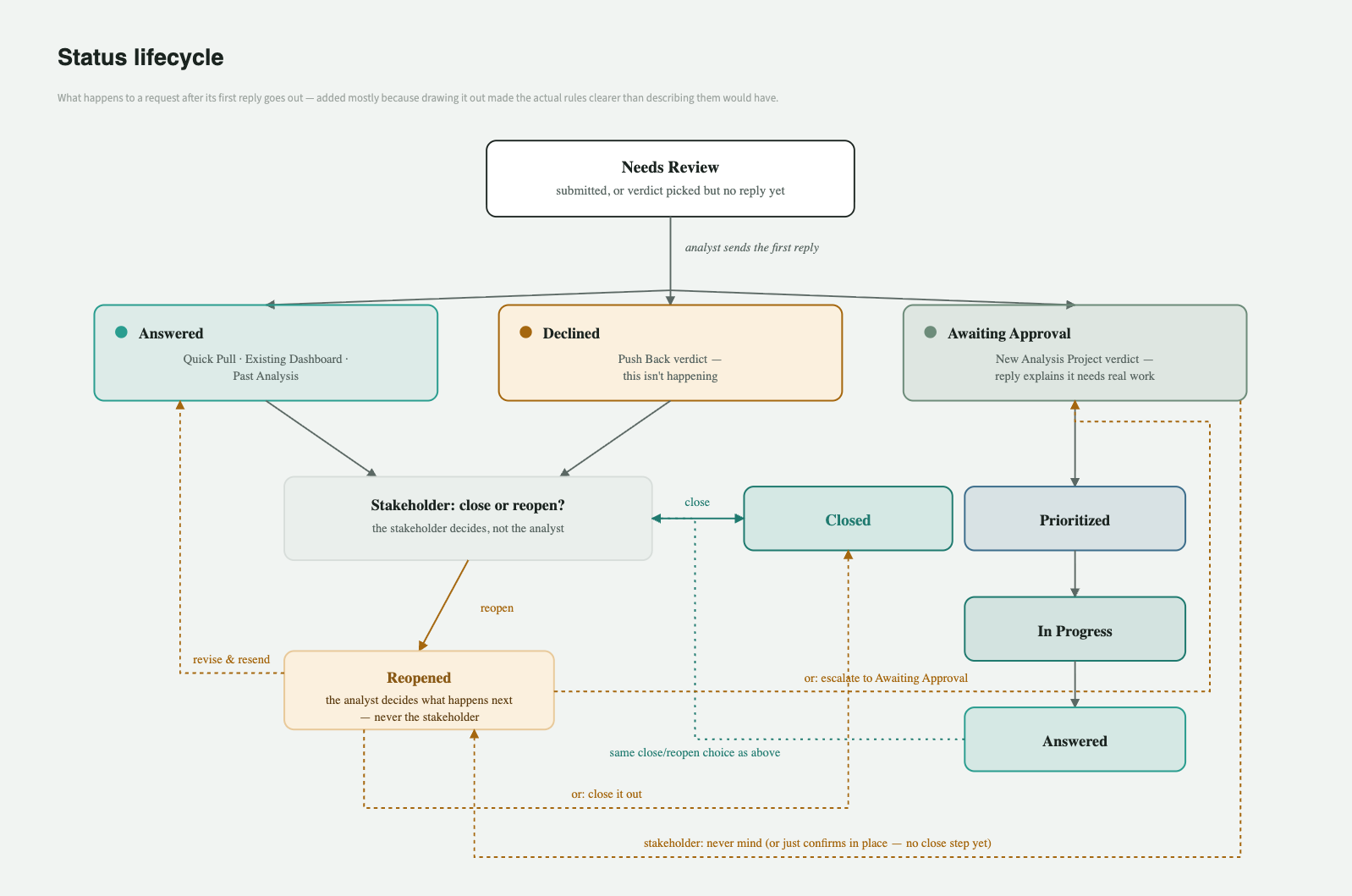
The tool gives you a plain-language place to actually talk through your analytics ask. If it's something the team has already answered, it can point you straight to the existing dashboard or past analysis, link included, with a quick how-to. For anything more involved, it walks you through a short, adaptive conversation about the business question behind your ask. It is not a static form, but real questions shaped by what you've asked and what's already in the knowledge base. From there, your request goes to an analyst. Once they've replied, you can keep the conversation going, mark it resolved, or, for anything that needs real analytics work, ask to have it prioritized into the sprint queue. You can check your own requests any time, or see what the whole team's queue looks like.
For analysts
The tool does two things: it helps turn a stakeholder's raw ask into something actionable, and it helps you build a knowledge base that both you and the AI can draw on later.
On the conversation side, the AI is prompted to walk stakeholders up the "so what" ladder itself: asking the probing questions, informed by what's already in the KB, and you'll see the results waiting in your queue, ready for you to tighten before anything goes back to the stakeholder. Take as much or as little of the AI's draft as you want. It's built to point stakeholders at an existing dashboard, a past analysis, or a near-identical past request before proposing new work from scratch.
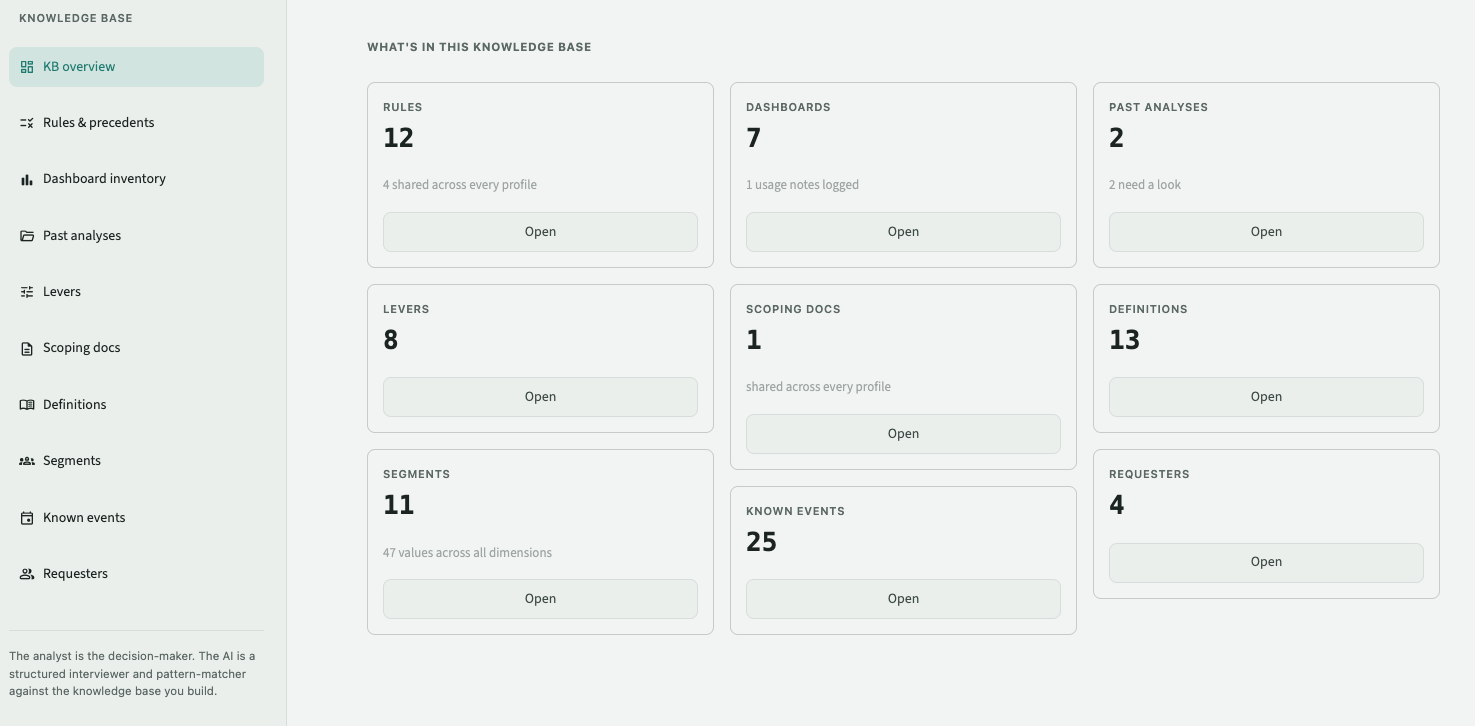
The knowledge base behind all of this covers your segments, definitions, known events, past analyses, dashboards, and levers, plus the heuristics that shape how the AI reasons about a request. It's yours to edit any time from the left nav, and the tool actively nudges you toward it: mention a sale or a campaign in a request, and it'll suggest adding it as a known event; describe a new way of segmenting players, and it'll suggest a new segment. The more you build it out, the better the tool gets at framing requests, routing stakeholders to existing work, and suggesting your own next step, including a first-draft scoping document, pulled straight from the KB you've built.
The cost of getting smarter
There's a tension built into a tool that asks you to keep feeding it: the richer the knowledge base gets, the more it costs to reference, because the whole thing rides along on every single AI call the tool makes. This is a concern worth paying attention to. A knowledge base that's ten times richer costs roughly ten times as much to reference, for as long as it keeps growing.
Two things in the tool address this concern directly. The knowledge base is cached rather than re-sent from scratch on every call, so a session that fires off several AI calls against the same, unchanged knowledge base (e.g. a round of follow-up questions, then triage, then a scoping draft) pays full price once and a fraction of it after that. And because a knowledge base that only ever grows accumulates its own kind of clutter - near-duplicate entries, definitions that got a little wordier with every edit - there's a KB hygiene review an analyst can run on demand: the AI proposes specific merges or trims, with its reasoning attached, and nothing changes until someone actually approves it.
Neither of those is the full answer yet. Caching only helps repeat calls against a knowledge base that hasn't changed; it doesn't change the fact that a bigger knowledge base still costs more on the first call. The real fix would be to pull in only the parts of the knowledge base actually relevant to a given request, instead of all of it every time. So far this is a next step I've deliberately held off building, because it trades against the thing that makes this tool trustworthy in the first place: right now, nothing in the knowledge base is invisible to the AI. As the tool matures the trade-off will be more worthwhile to think through.
None of this is meant to run without an analyst in the loop. The analyst is the decision-maker. The AI is a structured interviewer and pattern-matcher against the knowledge base you build — meant to take the repetitive, rote parts of intake off the analyst's plate, so they can spend their time on the part AI can't do.